In my
last blog post I insisted that
everyone should learn how to code. If you are a JIRA administrator who would like to do some advanced sort of stuff, keep reading, you'll find out how a little bit of coding can help marvellously. I have a limited
OOP background, in fact I've never been a Java programmer, so I find having to deal with this sort of things very exciting.
I wanted to do some cleanup of a huge JIRA instance that has been bit messed up with a LOT of schemes (workflow, issue type, field configuration, etc.). Something I learned from my past experience is, per-project schemes in JIRA is a very bad idea. It affects the manageability of the JIRA instance when it grows. When it comes to duplicate Field Configurations in JIRA, it is
extremely difficult to find them by hand.
Normally I would query the database to identify the duplicate schemes in such cases, but when I wanted to see how many duplicate JIRA field configurations exists, Oracle SQL met a likely dead end.
Here's the first SQL query I used:
SELECT
  FL.NAME FIELDCONFIG,
  LISTAGG(FLI.FIELDIDENTIFIER || ISHIDDEN || ISREQUIRED || RENDERERTYPE, ';') WITHIN GROUP (ORDER BY FLI.FIELDIDENTIFIER || ISHIDDEN || ISREQUIRED || RENDERERTYPE)
FROM
  FIELDLAYOUT FL,
  FIELDLAYOUTITEM FLI
WHERE
  FL.ID = FLI.FIELDLAYOUT
GROUP BY FL.NAME;
ORA-01489: result of string concatenation is too long

01489. 00000 -  "result of string concatenation is too long"

*Cause:    String concatenation result is more than the maximum size.

*Action:   Make sure that the result is less than the maximum size.
My plan was to list-aggregate each field's configuration against field configuration's name, and then use SQL "having" clause in a parent query to find out duplicates. This didn't work due to the limitations of Oracle's "listagg" function. Of course a custom "listagg" written in PL/SQL could have helped, but I didn't want to create any additional objects in the database. Also, I wanted to do something that I have never done before. Thus it came to Groovy.
First you need the
JIRA Script Runner add-on (in my case it was already there). This add-on provides a Script Console in which you can code Groovy. It doesn't come with a handy IDE, but just a basic code editor. Serves the purpose.
If you execute the following one line piece of code there, you'll see how simple it is. It's based on Java, but lot more simpler to use. If you are scared of OOP like I used to be, here's your chance to practice by swimming in shallow freshwater.
"<h1>Hello World!</h1>";
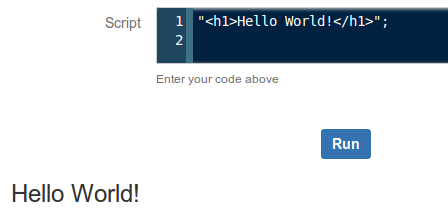 |
| It will do neat HTML! |
Here's the piece of code I wrote in Groovy. I'll explain how it serves the purpose as well.
import com.atlassian.jira.component.ComponentAccessor;
import com.atlassian.jira.issue.fields.layout.field.FieldLayoutManager;

log.setLevel(org.apache.log4j.Level.DEBUG);

FieldLayoutManager flm = ComponentAccessor.getComponent (FieldLayoutManager.class);

x = flm.getEditableFieldLayouts();
html = "< table>< tr>< th>Field Configuration< /th>< th>HashCode< /th>< /tr>";
x.each {
 l -> k = l.getName();
  v = l.getFieldLayoutItems().hashCode();
  html = html + "< tr>< td>" + k + "< /td>< td>" + v + "< /td>< /tr>";
}
html = html + "< /table>";
Edit: I've noticed that SyntaxHighlighter intermittently messing up with the HTML parts of the source code above. As a quick workaround I broke the HTML tags to avoid breaking the whole thing.
Alright, you got the fish, now here's how to fish. If you have a limited JIRA API knowledge like I do, it's better to start reading with the first two import lines. All you have to do is a Google search, entering the package name followed by "javadoc".
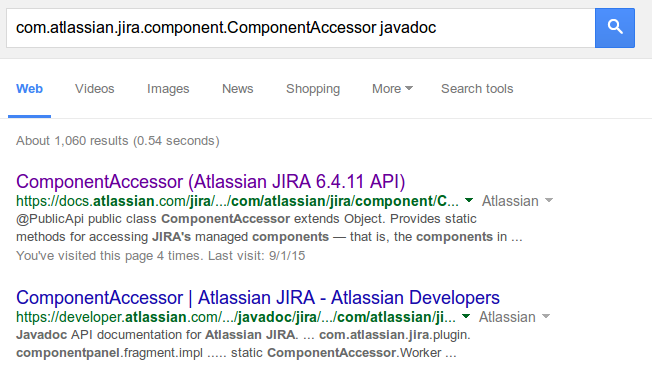 |
| Image courtesy: Google Web Search |
Everything seems neatly documented, right? How did I find that
FieldLayoutManager package will give me the exact information I need? For that I had to do some keyword searches on the web, go up and down in the API documentation and read some of the package descriptions carefully to choose the correct one.
I (had already) learned that
FieldConfiguration has a different meaning internally, and Field Configurations are internally called FieldLayouts. A FieldLayout has FieldLayoutItems, each item describes characteristics of a single JIRA/ custom field within its parent Field Configuration. The information I need here is a list of Field Configurations against aggregated list of each item's field characteristics for comparison. Initially I read through several interfaces under
com.atlassian.jira.issue.fields.layout.field package, but with a little common sense I soon realized that
FieldLayoutManager interface is going to give me the information I need (it manages the field layouts - so it might give me a list).
The next important line shows how you create a
FieldLayoutManager object. See that's not the 'conventional Java way' which we learned at school but using the
ComponentAccessor. This is something I learned from observing other developers' work, but the
reasoning is out there in the JavaDoc.
Next, we use the
getEditableFieldLayouts() method to get the list of all Field Configurations in the JIRA instance. As you can see in this line, you don't have to declare an array and then call the method. That's simplicity of Groovy. Now, the question is, what did it return? What's the value of
x? According to the method specification of
getEditableFieldLayout(), it's a
List of
EditableFieldLayout objects. In human readable terms, it's the list of Field Configurations in JIRA. Now we know the list of Field Configurations.
However, they don't come in pretty neat looking strings. They are still Java objects. Each Field Configuration returned is a Java object. We don't know what's inside yet. To see what's inside, I'd take a look at the JavaDoc of the
EditableFieldLayout class. It has two methods that I'm interested in, one is
getName(), which returns the human readable name of the Field Configuration. The next is,
getFieldLayoutItems(), which returns a
List of
FieldLayoutItem objects. That is the list of fields with characteristics of each.
But now, this list inside list thing is getting deeper by one level, and do we really need to dig that deep?
Here's the turning point. My original requirement was to find the duplicates. It doesn't mean that I should follow the same thing I attempted with Oracle. What I actually need is
something against each Field Configuration's name that
uniquely describes the entire Field Configuration.
This is where
hashCode() method in Java comes to play. Every Java
Object inherently gets this method. It generates a
unique 32-bit hash of the object that is is invoked from. Whenever the object changes, the hash also changes. In this particular case, what we need is to hash the
List of
FieldLayoutItem objects of each Field Configuration.
With a little bit of HTML formatting to append the Field Configuration - Hash pairs into JIRA Script Console's page, we get a nice table which we can copy-paste into a spreadsheet program and then easily find the duplicate items. Two Field Configurations have the same hash means both Field Configurations are identical.
Example output:
| Field Configuration | HashCode |
|---|
| Default Field Configuration | 179968652 |
| Copy of Copy of Default Field Configuration | 179968653 |
| Copy of Default Field Configuration | 179968653 |
| Copy of FC1 | 1290893968 |
| FC1 | 391319565 |
Just copy-paste the provided source code into your JIRA instance's Script Runner Console and see the results. Create a Field Configuration and execute again. Make a field mandatory in the new Field Configuration and then execute the script again to see that hash also changes. Revert back and the hash also changes to the previous value.
The piece of code I wrote here is not a big deal. I just took some effort
to describe it to those who have a little coding knowledge. But see the beauty of results!
Before I wind up, here's a couple of things you'll need to know as a newbie Groovy programmer:
- Executing .getClass().getName() method on any Java object returns the name of its constructor class. You can then google the classname followed by 'javadoc' to find all the information you need to know about that class, including available methods. This can be helpful when you work with any API you are not familiar with. With log.debug(), you can append this to the application log.
- I recently read in a funny webcomic that today's computer programming is actually 'Googling the StackOverflow'. Most of the things you need are already out there. What you need is to get the parts together and 'assemble' in the proper manner. Most of the time all you need to have from your own is a clear idea of what you are going to achieve, and the way you are going to achieve it.
- Although I started explaining the packages imported in the first two lines, the correct way to start writing your own script would be to find out the Java classes that represent the key objects that involve in your mission.
Coding improves your health, isn't it? Think how. Thanks for reading!


