Anything can go here, in any language... except my native language Sinhala. Be cool... anybody is warmly welcomed! :)

Showing posts with label administration. Show all posts

[JIRA Administration] How Groovy scripting makes your life easy

In my last blog post I insisted that everyone should learn how to code. If you are a JIRA administrator who would like to do some advanced sort of stuff, keep reading, you'll find out how a little bit of coding can help marvellously. I have a limited OOP background, in fact I've never been a Java programmer, so I find having to deal with this sort of things very exciting.

I wanted to do some cleanup of a huge JIRA instance that has been bit messed up with a LOT of schemes (workflow, issue type, field configuration, etc.). Something I learned from my past experience is, per-project schemes in JIRA is a very bad idea. It affects the manageability of the JIRA instance when it grows. When it comes to duplicate Field Configurations in JIRA, it is extremely difficult to find them by hand.

Normally I would query the database to identify the duplicate schemes in such cases, but when I wanted to see how many duplicate JIRA field configurations exists, Oracle SQL met a likely dead end.

Here's the first SQL query I used:

SELECT
  FL.NAME FIELDCONFIG,
  LISTAGG(FLI.FIELDIDENTIFIER || ISHIDDEN || ISREQUIRED || RENDERERTYPE, ';') WITHIN GROUP (ORDER BY FLI.FIELDIDENTIFIER || ISHIDDEN || ISREQUIRED || RENDERERTYPE)
FROM
  FIELDLAYOUT FL,
  FIELDLAYOUTITEM FLI
WHERE
  FL.ID = FLI.FIELDLAYOUT
GROUP BY FL.NAME;

ORA-01489: result of string concatenation is too long
01489. 00000 - "result of string concatenation is too long"
*Cause: String concatenation result is more than the maximum size.
*Action: Make sure that the result is less than the maximum size.


My plan was to list-aggregate each field's configuration against field configuration's name, and then use SQL "having" clause in a parent query to find out duplicates. This didn't work due to the limitations of Oracle's "listagg" function. Of course a custom "listagg" written in PL/SQL could have helped, but I didn't want to create any additional objects in the database. Also, I wanted to do something that I have never done before. Thus it came to Groovy.

First you need the JIRA Script Runner add-on (in my case it was already there). This add-on provides a Script Console in which you can code Groovy. It doesn't come with a handy IDE, but just a basic code editor. Serves the purpose.

If you execute the following one line piece of code there, you'll see how simple it is. It's based on Java, but lot more simpler to use. If you are scared of OOP like I used to be, here's your chance to practice by swimming in shallow freshwater.

"<h1>Hello World!</h1>";
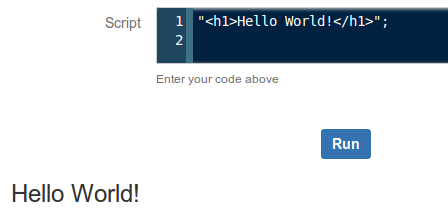
It will do neat HTML!

Here's the piece of code I wrote in Groovy. I'll explain how it serves the purpose as well.

import com.atlassian.jira.component.ComponentAccessor;
import com.atlassian.jira.issue.fields.layout.field.FieldLayoutManager;

log.setLevel(org.apache.log4j.Level.DEBUG);

FieldLayoutManager flm = ComponentAccessor.getComponent (FieldLayoutManager.class);

x = flm.getEditableFieldLayouts();
html = "< table>< tr>< th>Field Configuration< /th>< th>HashCode< /th>< /tr>";
x.each {
 l -> k = l.getName();
  v = l.getFieldLayoutItems().hashCode();
  html = html + "< tr>< td>" + k + "< /td>< td>" + v + "< /td>< /tr>";
}
html = html + "< /table>";

Edit: I've noticed that SyntaxHighlighter intermittently messing up with the HTML parts of the source code above. As a quick workaround I broke the HTML tags to avoid breaking the whole thing.

Alright, you got the fish, now here's how to fish. If you have a limited JIRA API knowledge like I do, it's better to start reading with the first two import lines. All you have to do is a Google search, entering the package name followed by "javadoc".

Image courtesy: Google Web Search

Everything seems neatly documented, right? How did I find that FieldLayoutManager package will give me the exact information I need? For that I had to do some keyword searches on the web, go up and down in the API documentation and read some of the package descriptions carefully to choose the correct one.

I (had already) learned that FieldConfiguration has a different meaning internally, and Field Configurations are internally called FieldLayouts. A FieldLayout has FieldLayoutItems, each item describes characteristics of a single JIRA/ custom field within its parent Field Configuration. The information I need here is a list of Field Configurations against aggregated list of each item's field characteristics for comparison. Initially I read through several interfaces under com.atlassian.jira.issue.fields.layout.field package, but with a little common sense I soon realized that FieldLayoutManager interface is going to give me the information I need (it manages the field layouts - so it might give me a list).

The next important line shows how you create a FieldLayoutManager object. See that's not the 'conventional Java way' which we learned at school but using the ComponentAccessor. This is something I learned from observing other developers' work, but the reasoning is out there in the JavaDoc.

Next, we use the getEditableFieldLayouts() method to get the list of all Field Configurations in the JIRA instance. As you can see in this line, you don't have to declare an array and then call the method. That's simplicity of Groovy. Now, the question is, what did it return? What's the value of x? According to the method specification of getEditableFieldLayout(), it's a List of EditableFieldLayout objects. In human readable terms, it's the list of Field Configurations in JIRA. Now we know the list of Field Configurations.

However, they don't come in pretty neat looking strings. They are still Java objects. Each Field Configuration returned is a Java object. We don't know what's inside yet. To see what's inside, I'd take a look at the JavaDoc of the EditableFieldLayout class. It has two methods that I'm interested in, one is getName(), which returns the human readable name of the Field Configuration. The next is, getFieldLayoutItems(), which returns a List of FieldLayoutItem objects. That is the list of fields with characteristics of each.

But now, this list inside list thing is getting deeper by one level, and do we really need to dig that deep? Here's the turning point. My original requirement was to find the duplicates. It doesn't mean that I should follow the same thing I attempted with Oracle. What I actually need is something against each Field Configuration's name that uniquely describes the entire Field Configuration.

This is where hashCode() method in Java comes to play. Every Java Object inherently gets this method. It generates a unique 32-bit hash of the object that is is invoked from. Whenever the object changes, the hash also changes. In this particular case, what we need is to hash the List of FieldLayoutItem objects of each Field Configuration.

With a little bit of HTML formatting to append the Field Configuration - Hash pairs into JIRA Script Console's page, we get a nice table which we can copy-paste into a spreadsheet program and then easily find the duplicate items. Two Field Configurations have the same hash means both Field Configurations are identical.

Example output:
Field ConfigurationHashCode
Default Field Configuration179968652
Copy of Copy of Default Field Configuration179968653
Copy of Default Field Configuration179968653
Copy of FC11290893968
FC1391319565

Just copy-paste the provided source code into your JIRA instance's Script Runner Console and see the results. Create a Field Configuration and execute again. Make a field mandatory in the new Field Configuration and then execute the script again to see that hash also changes. Revert back and the hash also changes to the previous value.

The piece of code I wrote here is not a big deal. I just took some effort to describe it to those who have a little coding knowledge. But see the beauty of results!

Before I wind up, here's a couple of things you'll need to know as a newbie Groovy programmer:
  • Executing .getClass().getName() method on any Java object returns the name of its constructor class. You can then google the classname followed by 'javadoc' to find all the information you need to know about that class, including available methods. This can be helpful when you work with any API you are not familiar with. With log.debug(), you can append this to the application log.
  • I recently read in a funny webcomic that today's computer programming is actually 'Googling the StackOverflow'. Most of the things you need are already out there. What you need is to get the parts together and 'assemble' in the proper manner. Most of the time all you need to have from your own is a clear idea of what you are going to achieve, and the way you are going to achieve it.
  • Although I started explaining the packages imported in the first two lines, the correct way to start writing your own script would be to find out the Java classes that represent the key objects that involve in your mission.
Coding improves your health, isn't it? Think how. Thanks for reading!

Save your day with JIRA AUI JavaScript Hacks

I've been a JIRA administrator for more than four years with the hope that time would permit me to blog anything about JIRA. Finally here it has come to that - my first blog post on JIRA administration!

So what I'm going to talk about today is how AUI JavaScript hacks can save a JIRA administrator's time and make his life easy.

AUI is an abbreviation for Atlassian User Interface Library. AUI JavaScript is actually a modified version of the famous JavaScript framework jQuery. Thus, the most of jQuery's official documentation works with AUI without a hassle.

Now, let me explain a case where AUI hacks can save you from cumbersome work.

Changing the workflow scheme of a JIRA project

It really frustrates me of when it comes to the status mapping part. I hate repetitive work. Especially when your JIRA project has a lot of issue types with a lot of Issues this step is a nightmare.

And this list repeats with all available issue types...
For simplicity, let's just assume all issue types follow the same workflow in the workflow scheme. Imagine your JIRA project has ten issue types and current workflow has ten statuses that do not exist in the new workflow. Then JIRA will give you 10 × 10 = 100 drop down lists to pick the new status mapping for each type-status. And it's a highly error prone when you do this by hand.

So how do we get through it in a 'hacker' way? Learning how to code is a worthy investment. :)

I’m using the Mozilla Firefox web browser with Firebug add-on here because it’s my familiar environment. But you can use vanilla Firefox or Chrome browser with pre-built development tools. First, when you are at the status mapping step, inspect a drop-down list using Firebug.


And then,


When you expand the HTML code for the select list, the HTML elements for the available options become visible. The value for each option is actually the ISSUESTATUS.ID column in JIRA database.

Looking at the structure of the page, jQuery's official documentation, AUI documentation you can quickly come up with a JavaScript code to change each drop down list's selected option to "In Progress" like this:

AJS.$('select option[value="3"]').attr('selected','selected');

The code says, "Make every drop down option who's value is 3 (In Progress) the selected option of its parent select element". Execute it in the Firebug script console and you can see all the drop down lists change their selection at once.


Now that was simple. Imagine you have discussed with the project stakeholders about how existing issue statuses should be mapped and agreed upon a mapping. For this example, let's take only two statuses.

Investigating --> In Progress
Verified --> Closed

Now, you can't use the above one line code because you want to 'filter off' old statuses other than "Investigating" before you change the values to "In Progress". Same applies to the "Verified" old status.

Don't panic. Let's just dig little deeper. If you carefully look at the "name" element of the select element we observed above, it says "mapping_1_10105". We have no idea what these numbers are for now, but with a little more inspection you will see in each drop down list where old status is "Investigating" the select element's name ends with 10105. (yes, it's very likely that status ID of "Investigating" is 10105)

Now, with a little more jQuery knowledge (read more about jQuery selectors), we can modify the above code as follows:

AJS.$('select[name$="_10105"] option[value="3"]').attr('selected','selected');

And for the "Verified" old status we can come up with something like this:

AJS.$('select[name$="_10101"] option[value="6"]').attr('selected','selected');

Just few lines of code and you're through a one cumbersome boring step with a big WOW! :)

Now, here's a question that some of my audience may ask:

What is the benefit of this whole process if you have spend more time on Firebugging and reading jQuery documentation than you could have just updated all entries by hand within a couple of minutes?
  • Because coding is so exciting and everyone should learn how to code. :)
  • Because this approach is less error prone. If your client or stakeholders are paranoid about data integrity, a wrong selection on a production environment can end up in a nightmare for real.
  • If you are doing data migration projects that have to do multiple rounds of testing and UAT, then this approach is a one time investment. You can save your code somewhere and reuse in each testing iteration. This ultimately saves a lot of time.

This blog post would have become unnecessarily long if I were to explain another case. So I won't be discussing more examples here. But AUI JavaScript is a cool thing to play with. Prepare your own evaluation instance of JIRA and you will see many ugly setups can be handled with simple pieces of JavaScript code. So play around, learn and share!

And to finish,... thanks for reading!


(The screenshots and examples used in this blog post do not reflect any of the JIRA setups I worked with at my previous or present places of work. All screenshots and examples are my own work on an evaluation instance of Atlassian JIRA)

Attack and the Defence


Hi dear readers! First of all, I WISH YOU A HAPPY AND PROSPEROUS NEW YEAR WITH LOT OF ACHIEVEMENTS, GLORY AND JOYNESS!! Anyway, 2012 is also approaching.. :D (just kidding)

After a long long time, I've got an interesting problem to solve. I'm not an expert. I'm just writing my own way that I followed in the situation.

This happened during the Christmas days in 2009, and after all, I feel it like a Christmas gift, seriously! :-) I wrote two blog posts in my native language, I you can read, just visit the following links. You'll find it more interesting than this one if you can read. :)
  1. http://blog.shaakunthala.com/2009/12/hacker.html
  2. http://blog.shaakunthala.com/2009/12/bash.html
Alright, then... I'm responsible for the administration of several websites. As I feel, an administrator's job is very much similar to the job of a sea captain. He has to look after the system, like his own... be vigilant of the attacks and other problems,.. and many more work.

Recently, I've been notified that one of my sites is down. An empty page with an error message is displayed when the site is visited, and according to that error message, there's an error on index.php, line 38 and the character < is the cause. This is the way how PHP shows error messages. As my immediate actions, I logged on to the FTP server where our website is hosted and opened the index.php

The website was developed using a CMS. The code looked some kind of strange for me because it had no corresponding ?> tag for its beginning <php tag. An unknown HTML/ Javascript code snippet has appended at the end of the file.

Yes, that's the cause of that error. Somebody has injected a malicious code snippet at the end of the index document, and the PHP engine on the server side has tried to interpret it as PHP. As this has caused a syntax error in PHP, the whole site has gone down as the final result.

Here's the structure of index.php :

<?php
/* PHP
codings of
CMS */

<script> // The foreign Javascript code snippet </script>

What I did is, just copy-pasted the code into a separate text file (for analyzing), and cleaned index.php. Then everything looked normal, but sooner I got to know, actually it is not.

I've never experienced such a situation before. I didn't know where to start, and what to do. But I wanted to find out what the code says. It was some kind of scary and big JavaScript code in a single line. However, it's not so scary!


Okey,... a closer look...


Right... and this is our troublemaker...


Just see carefully,.. you don't need to be a JavaScript guru. :-)


It's not a big deal to identify such big codes. Vigilance is what matters here. They have used the replace () method in JavaScript. See... strategically hiding text by just randomly mixing punctuation, retrieving the original text at run time. Wow!

Finally, it's this:


Looks like it has been created for phishing purposes... but I'm not sure exactly. However, this URL points to an empty page. What I expected was a JavaScript code, but this resulted nothing... I don't know a reason. :-/

Within few hours after fixing the issue, I got to know that our website is down again. The same thing has happened, same style, but the malicious code resulted a different URL. I fixed it again, and started thinking... what on earth could be happened here? :-O

Whoever the attacker has done is injecting some malicious code into the index document, and letting it execute at the client's (browser) end. However, as the code has blindly appended at the end of the file despite the structure of it, I came to a conclusion -- definitely this is done by a bot / script or some other automated mechanism.

So, I did the same operation as before for cure, and then tried to find some solution. Yes, it's gonna be a new experience. To prevent further attacks, I put the following line at the end of the index.php file. It prevented interpreting any code below the line. When I say die!, no further interpretation of code at all. Hence, the site is safe from being down, but the risk is still their till I find where the attack comes from and where the security hole is.

die ();

I tried to find any clue on site logs,.. but no luck. If this attack was carried out through HTTP, site logs (not the CMS logs) should indicate that. What I suspect is, somebody has gained access to the server, and executed a script. By adjusting file permissions on the index document, I found out that the malicious script on the server (or bot) has gained the root access.

Later, I got to know, this has recursed into directory hierarchy through the entire site. And also, I saw that some JavaScript files are also infected. It was shocking! Everything throughout the site can be potentially infected with malicious code and hence unsafe for visitors!! I didn't know how serious the attack was. I have never faced such a situation before, and as the responsible personnel, I have to fix this as soon as possible, with my best efforts.

According to all observations, my conclusion was, this is happened due to the fault of the web hosting provider. I know that CMS' sometimes can contain security holes, but if it was, there should be at least something on the site logs.

All of the above is the summary of my first blog post, mentioned at the top of this post. The next few paragraphs in this post explain how I performed the disinfection.

 ---

The only backup we had was bit old, so I forget the idea of restoring from a bacup archive. The challenge was to find out how serious the attack was, and to disinfect everything.

What I suspect so far:
Every JavaScript file and index document is infected -- but not sure about other text-based file formats.

So I have to check each file for malicious code, and then clean them.

First, I thought of writing a PHP script for the purpose. But, PHP is bit insecure with this work. I know, it's not a big deal to fix the security with PHP, but, I was more interested in bash scripting. As a daily Linux-only computer user, I am very familiar with bash, and feel more reliability with that.

Luckily, the web hosting service provider has offered remote access through ssh. Yes, that's great! I was very keen, the rest's gonna be a party!! ;)


Here's the match highlights... :P

Access through ssh, compress the entire site, and then download it. This is necessary because the safe way is to keep a backup + do a testing when doing something serious. One mistake, could ruin everything!!

Here we go, ssh
$ ssh user@mysite.com

Create an archive, (make it tar.bz2 for higher compression ratio -- easy to download). Then exit ssh.
$ tar cvfj mysite.tar.bz2 mysite/
$ exit

Download the backup, through ssh copy.
$ scp user@mysite.com:/home/user/mysite.tar.bz2 /home/shaakunthala/

Unpack on my computer, to be tested with the script.
$ tar xvjf mysite.tar.bz

Now, next step is to write the script. Fired up my favourite vim editor, and then started thinking. ;) Before writing the script it's necessary to exactly identify the nature of the malicious code. Here's what I've identified:
  • If a file is infected, the malicious code is at the end of the file.
  • The foreign code snippet is different from point to point. But, following text portions can be recognized as a common pattern.
    • GNU GPL
    • window.onload
    • .replace
  • Although it seemed like the infection is only with JavaScript and index documents, I refused to accept that. Also, as we didn't have any gigantic files with our website, I decided the script to test all files throughout the site.
Although it was such an easy task to write a script for malware removal, I had to separate the program into two scripts because find -exec does not recognize functions in bash. So, here's what I wrote:

sitefix.sh
#!/bin/bash
# Author: Sameera Shaakunthala

rm fixlog.txt
rootdir=`pwd`/mysite/
sup=`pwd`"/fixfile.sh"
find $rootdir -exec $sup {} \;
echo "JOB DONE!"

fixfile.sh
#!/bin/bash
# Author: Sameera Shaakunthala

echo "Processing file: "$1
code=`tail --lines=1 $1 | grep "GNU GPL" | grep window.onload | grep .replace`
l=`echo $code | wc -m | awk '{ print $1 }'`

if [ $l -ne 1 ]
then
 lc=`wc -l $1 | awk '{ print $1 }'`
 lc=`expr $lc - 1`
 head $1 -n $lc > tempfile.tmp
 mv tempfile.tmp $1
 echo "File "$1" has been fixed!" | tee -a fixlog.txt
fi

Now, the next task is the test run on my local machine. If this succeeds, it is safe to run the script on the server.

$ chmod +x sitefix.sh fixfile.sh
$ ./sitefix.sh

After execution, I checked the fixlog.txt, which is the output log of the script. OMG! 602 infected files!! :-O I vigorously checked some randomly selected files, they were clean, and as everything seemed to be clean, I uploaded the script to the server, and then executed. :)

$ scp sitefix.sh fixfile.sh user@mysite.com:/home/user
$ ssh user@mysite.com
$ chmod +x sitefix.sh fixfile.sh
$ ./sitefix.sh

Finally, we have set this as a cron job, till we find the actual security hole.

The final result was, the disinfection of the entire website, within few minutes. As I got to know that virus scanners no longer block our website, it was confirmed that the site is clean. Just see the spirit of Linux bash scripting! :)

Hallelujah!

Finally, I put a link to a shocking article that must be read... Just click and see! :(

Finally, captain Shaakunthala saved the day, with the support of other captains and sailors, yeah it's an amazing Christmas gift for a newbie administrator! :D

How I Prepared My GRUB-Bootable USB Flash Drive


Again... the GNU GRUB. I really can't forget such an interesting software that I can study. Today, I'm going to put the English version of my another Sinhala blog post. It's about how I made my flash drive a bootable one.

Now you might say,.. "That's pretty easy stuff with Windows... Just right click and Format...."; wait.........! I'm not going to talk about the DOS/ Windows bootloader. DOS/ Windows bootloader is nothing compared to the GNU GRUB. What I'm going to put here is how to put the GRUB + kernel into your flash drive.

First, I would like to give a small introduction on the GNU GRUB. Wikipedia got a whole lot of information,.. but I'll also explain. Simply, GRUB is a bootloader. A bootloader is the program loads the operating system when your computer boots. Have you ever seen the "NTLDR is missing" error on a Windows XP installed system? Yes, that NTLDR is the bootloader of Windows NT based operating systems. There are two most used types of bootloaders with Linux. One is LILO (LInux LOader) and the other is GRUB (GRand Unified Bootloader). Due to numerous reasons the most popular bootloader among the two is the GRUB. I'm not going to list them here,.. but believe me.. the GRUB is really a 'thing' to study!

So,.. we are bit off the topic.Let's get back on it. How would it be if I install the GRUB on a USB flash drive? That's what came into my mind when I was reading the posts on UCSC LMS (I'm a student). Yes, it would be great! There are several advantages I can think of.
  • If I boot a Live CD, it takes some time. But, here as it is a bootloader only system, it takes a less time to boot up.
  • I can study further,.. (I'm not a Linux expert)
  • I can hijack Linux systems,... :D
  • I can check the RAM using memtest+86.bin kernel

I have a 4 GB flash drive. So here's how I did with it:

1. Backed up all the data on the flash drive as I'm gonna partition it.

2. Divided the drive into two primary partitions. It doesn't matter whether it is primary or logical, but as I didn't need any more partitions, I set it as this.

# fdisk /dev/sdb

One partition is a FAT-32 one to keep my personal files,which I might need to use with both Windows and Linux. It should be the first partition on the flash drive. Unless, Windows will spoil up everything. I left 50 MB at the end of the partition table as unpartitioned/ free space which I'm going to use for the boot partition.

As I've mentioned earlier, Windows can not identify the partitions other than the physically first partition on the flash drive partition table. That means, even if the partition number is not 1, it should exist first to be identified by Windows.

The second one, is nearly 50 MB, and is ext-2 type. It holds the GRUB's files and the kernel.

Formatted the partitions using the following commands:
# mkdosfs /dev/sdb1 -v -F 32 -n LEONIDAS_4G
# mke2fs /dev/sdb2 -L boot

Now mounted them,
# mkdir /media/data; mount -t vfat /dev/sdb1 /media/data

# mkdir /media/boot; mount /dev/sdb2 /media/boot

3. Well, there could be a systematic way to do this. But, I'm not a Linux expert. So, please don't laugh at me. This is how I did it:

# cd /
# cp -rfv boot /media/boot

Now, the GRUB installation, the thing I recently got to know from our LMS forum.

# grub
grub> find /media/boot/boot/grub/stage1

Now it gives the following output:
(hd1,1)

According to the notation, the second partition on the flash drive is (hd1,1). The next step is;

grub> root (hd1,1)
grub> setup (hd1)
grub> quit

Now, the GRUB has been installed on the flash drive.

4. Now I carefully examined the boot partition on the flash drive. There were two versions of the kernal and related files. This might be probably due to a kernal update on my system. It doesn't matter. I kept the most recent version and deleted the other.

5. Finally I edited the menu.lst, which caontains the initial configuration of the GRUB, when it boots. Here's the entire menu.lst file:

title    Linux kernel 2.6.27-14-generic
root     (hd0,1)
kernel   /boot/vmlinuz-2.6.27-14-generic root=UUID=d1670f8e-eb3f-4dba-bba5-e00f0437e2a2 ro single
initrd   /boot/initrd.img-2.6.27-14-generic

title    memtest86+
root     (hd0,1)
kernel   /boot/memtest86+.bin


There's another few important things to state here. Althoug the flash drive is (hd1) here, it becomes (hd0) when booting. The reason is almost obvious, when you set it as the first boot device on the BIOS, it becomes the first device.

The next thing is the UUID. UUID is sent to the kernel as a parameter. You can find the UUID using this:

# vol_id --uuid /dev/sdb2

6. Okey,.. I'm almost done. The final step is to boot. The GRUB loading can bee seen and then the boot menu. You can either edit the menu and boot the kernel on the hard disk or boot the kernel on the flash drive.

There is no init on the flash drive because I didn't put it on the drive. So when booting, it show an error message, and drops into a BusyBox shell. It works on the RAM (initramfs). In simple terms, there is a shell = we can make use of the kernel. :)

7. Restore the backup (personal data/ files) onto the FAT 32 partition on the flash drive. If you plug the flash drive inta a Windows machine, the whole thing may look like this:


Do not delete any of the partitions using the Windows Disk Management Console. If you want to format your data drive, you can go through My Computer and format. Do not touch the other one as it could ruin the entire filesystem on the flash drive which we have built so far. Also if you want to adjust the partition table, the safe option is to do it with Linux.

Finally, I have to say is I've experimented and learnt something new. And I wanted to share my experience here!

Thanks for reading.

Disk Maintenance with Ubuntu Live


Well, I thought of writing about some disk management which you can do with just using an Ubuntu Live CD.

First thing is, we don't need the GUI. Forget it. The text mode works considerably faster. After loading the initial screen of the Ubuntu Live CD, select the language, then press F6. You get a line that can be edited, and ends with the following parameters:

initrd=/casper/initrd.gz quiet splash --

Replace quiet splash with this:

ro single

And press Enter. Now the system boots into the single user mode. In other words, you are taken into the text mode. In later versions of Ubuntu, you get a menu. Just select root and you'll become root user! You can backup your disks, partition disks, file system check and many more!

Partitioning disks:
Just use either parted or fdisk. Personally I would prefer fdisk.
# fdisk -l (to list all filesystems)
# fdisk /dev/sda (to partition the first disk which is SCSI)
# parted /dev/sda (to partition the first disk which is SCSI)

Dont panic! Help is provided inside these commands. You just need to know plain English and the way that a partition table is structured (theory). :)

Format disks:
# mke2fs /dev/sda1 (format the partition as ext-2)
# mke2fs -j /dev/sda1 (format the partition as ext-3)
# mkntfs /dev/sda1 (format the partition as ntfs)
# mkdosfs /dev/sda1 (format the partition as FAT12/ FAT16 or FAT32)
# mkswap (format as swap)

Filesystem check:
# fsck /dev/sda1 (check and repair Linux filesystem on the drive, the partition should be unmounted first!!!)
# dosfsck /dev/sda1 (check FAT12/16/32 filesystem)

Tune Filesystem:
# tune2fs /dev/sda1 (tune adjustable parameters on a Linux filesystem)
Linux filesystems are periodically checked for  consistency during boot. You can adjust that time period with this tool.
# tune2fs -c 60 /dev/sda1 (set fsck to be executed on /dev/sda1 once a two months)

Backup your data into another drive:
Just execute the following commands one by one. Please refer this thread for a broader discussion.
# mkdir /source
# mount /dev/sda1 /source; mount /dev/sdb1 /mnt
# cd /mnt
# tar cvpzf backup.tgz --exclude=/source/lost+found --exclude=/mnt /source

To restore later (assume the backup archive is located at /dev/sdb1),
# mkdir /mnt/backup /mnt/restore
# mount /dev/sda1 /mnt/restore; mount /dev/sdb1 /mnt/backup
# cd /backup
# tar xvpfz backup.tgz -C /restore

Repair GRUB bootloader:
I got to know about this from here. Not everybody can access that site, so I'll put the whole thing here. Enter the following commands one by one.
# grub
/find/grub/stage1 (find the corresponding values for x and y for the next step)
root(hdx,y)
setup(hdx)

Execute binaries on an existing Linux installation:
# mount /dev/sda1 /mnt; chroot /mnt
You can change the root password too!!! :-O

Wanna see how NTFS is supported on Ubuntu?
Just type ntfs at the root shell prompt and press the Tab twice. I'm not gonna put it here.

If you think I might have forgotten anything to put here, don't hesitate to share it here... Thanks for reading!

Followers

Subscription Options

 Subscribe in a reader

or

Enter your email address:

and
to inscrease

and make me happy. :)

Other Blogs by the Author

The Author

www.flickr.com
ශාකුන්තල | Shaakunthala's items Go to ශාකුන්තල | Shaakunthala's photostream
free counters
TopOfBlogs
Related Posts with Thumbnails