Anything can go here, in any language... except my native language Sinhala. Be cool... anybody is warmly welcomed! :)

Showing posts with label windows. Show all posts

After BSOD -- Windows Se7en

As most of my readers know my day-to-day desktop OS is Ubuntu (Linux). However I still use Windows (on VirtualBox) in certain cases, usually software testing. These days I'm involved in some work that involve 'eavesdropping' on COM port for nothing but පිටිපස්සේ අමාරුව. :P

When I switch from seamless mode to windowed mode, the machine held itself. On the top there was a greenish stripe with some random dots, and mouse pointer animation has stopped. However I could move the mouse over -- of course I should be able to do that since it supports mouse pointer integration.

I waited about 5 mins for the VM to respond; and there was no response and I rebooted. After reboot I got to know that it was a BSOD :P . I never knew before -- so no screenshot.


So that's how BSOD in Windows Se7en on VirtualBox! (It's not really blue :P )

Solution for Some USB Flash Drive Problems


Today I'm gonna put the English translation of one of my Sinhala blog posts, which talks about a solution some possible problems that might occur with USB flash drives. Roughly I would say the solution is to destroy and rebuild the filesystem on the device. But this is not actually the same content from original blog post.

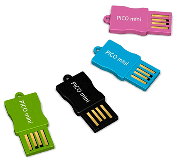
Well, most of us are carrying those portable memory devices... some call it pen drive... and some call it flash drive... and some other may call thumb drive. Whatever it is, it has become an essential thing with our day to day life.

First, I must tell an important thing,.. pay extreme attention when following these instructions. Unless, a single mistake could ruin your entire hard drive!

OK, the first thing that I'm going to point out is, you may have seen that capacity of a flash drive is indicated less than the value printed on it. I'm not talking about indicating a 4 GB drive as 3.77 GB. Sometimes you might have seen a scenario where the drive has been indicating 3.77 GB, but later it has become a lower value like 1.2 GB. Yes, I'm talking about that problem.

In certain other cases, Windows would not detect the device. It might show a message like 'Insert disk...' also.

As far as I think, the reason behind this might be physical, electrical or electronically damage to the device. Also, viruses are also a suspect. However, if the damage is too severe, then you might not be lucky enough to succeed with these instructions. I have tested this several times successfully, but unsuccessful attempts are there as well.

So, my instructions are based on Linux, to be executed on a command line shell, free, open and adventurous! :)

First, you need to backup existing data on the device. Use any backup tool or you can use the following command. (Assumed that the flash drive is /dev/sdb and it's filesystem is FAT32)
# mount -t vfat /dev/sdb1 /mnt
# tar cvpzf backup.sdb.tgz /mnt

If you are not sure about the device file (/dev/?d?), just enter the following command and identify your flash drive.
# fdisk -l

Now unmout the device if mounted.
# umount /dev/sdb

Then we will clear everything on the device, including it's partition table (overwriting MBR). We do not have this option with Windows.
# fdisk /dev/sdb
Enter o to create a new disklabel (this is not the drive label which we can see on a windows parition)
Enter w to write the MBR and exit fdisk.

Now, create the only partition on the flash drive. Of course you can have multiple partitions on the flash drive. But I'm not sure about whether Windows would detect all the partitions.
# fdisk /dev/sdb
Enter n to create a new partition.
Enter p to make it primary.
Enter 1 as the partition number.
Press Enter twice to use default starting and ending points.
Enter w to write changes and exit.

We have finished setting up the partition, now the next thing is to format. It's a good choice to format as FAT32 because when you do so, the drive can be used with both Windows and Linux. If the device capacity is more than 4 GB, I would recommend NTFS. Well, that would be another story. I'm gonna write about that some day as well. If it is the memory stick on your mobile phone, your choice should be FAT16 -- this depend on your phone's type also.

To format as FAT32,
# mkdosfs -F 32 -cv -n DRIVELABEL
I use verbose (-v) option so I can see the progress, -c is to probe for bad clusters (this can take some time), and -n for Windows disk volume label (DRIVELABEL in this example) which can be or less than 11 ASCII characters.

To format as NTFS,
# mkntfs -C -I -v -L DRIVELABEL
-C to enable compression, and I to disable indexing (Windows XP), -v for verbose output and -L for volume label which cab be or less than 32 ASCII or unicode characters.

So, this is the end of my post. This method is not alwsys successful, but I was lucky in two of three situations.

Thanks for reading!

Windows 7 on Jaunty

I'm just about to install Windows 7 inside a virtual machine on Jaunty (Ubuntu 9.04). I allocated 512 MB of RAM for the virtual machine. I don't know whether it would be enough. I'm not sure whether I would be able to do it.

Recently I switched to Ubuntu, but because of in some cases I would still need Windows, I decided to install Windows XP inside a virtual machine managed by VirtualBox. The VM in following screenshots is made for Windows XP, but I'm tring out Windows 7.

However, here are the screenshots...


Windows 7 on Ubuntu 9.04


VM named Windows XP, but actually runs Windows 7

VirtualBox Seamless Mode works Perfect


Finally, I've done it and now it's time for some kinda new desktop experience. :)

Stupid Hardware Tweak

Today I was using a Windows GUI application for some purpose, and after certain point it started showing that Abort/Retry/Ignore repetitively. But I wanted to ignore these errors and continute the stuff. Waiting for errors and clicking on the Ignore button wastes a lot of time.

So here's how I automated it using my own simple trick :P ... it worked for me perfectly!


[click to enlarge]

Back to Vice City

Last few days.... actually the Sinhala and Tamil New Year vacation, during that time I were with lots lots of fun stuff. One of those was playing GTA Vice City. It's my favourite computer game. There are other releases such as Liberty City, San Andreas and etcetera etcetera I know. But, Vice City is Nice. What fantastic story! [read the story]

Vice City is not for kids. So if you find this annoying or you are under 18, then leave! :D

I have finished this several times before, but, I have mentioned in my previous post, I'm gonna get rid of Windows OS. No Windows = No Vice City. I'm never gonna be with Windows again. (Getting rid of Windows is not death yes I know ;) ) So this is the last time.

Finishing the game is pretty easy without cheats. I don't know why lot of people cheat in these games, but, cheating is not necessary. If you listen well, if you have a good ability to think, if you are a strategic person, then Vice City is nothing for you.

So I thought of writing some tips for Vice City lovers. These will help you to succeed in the Vice City in a short period of time.

***

Try to find at least 10 of 100 hidden packages -- A hidden package is not just 100 bucks. 10 hidden packages will give you a body armour (at the Ocean View Apartments and other non-business properties). More hidden packages will enable more weapons and stuff.

Do a vigilant mission when you have enough weapons -- This will increase the body armour strength from 100 to 150 permanently. I said when you have enough weapons,... because it's gonna be lot more than a rampage. It's a mega rampage! Do this when there is a nearby safehouse, so you can easily get full health by just running into the cassette tape sign.
First Step:
Shoot at a cop. You'll get two stars and they'll follow you. Cover yourself and shoot... shoot... and shoot. Don't stop. When you get three stars, here comes a helicopter.. just get the sniper and shoot the pilot,.. helicopter will crash. Four stars... here comes the military, things getting harder.. Five stars.. FBI,... and Six stars... whoa! Rhinos!! Vice City forces bring you tanks. Just get the sniper and shoot at the driver. Then, run (sprint actually) to the tank and get in. As soon you get in the tank, hit the left Ctrl key repetitively to make sure you kill the nearby cops and agents. Now, get on the road and drive to star bribes to get rid of cops (Pay n' Spray won't work). Turn the canon around 180 degrees, and fire to increase the speed, otherwise they'll bust you. Avoid hitting police vehicles. Go to a safehouse that has a garage and park the tank. Save the game.
Second Step:
Get on the tank and press Caps Lock. Then you'll start the vigilant mission. Don't care about cops, but at least until the sixth level, try to avoid cops. You can hit the enimies with the tank or fire. Beat a level 12 vigilant mission and save. Viola! You get 150 of body armor plus money.

Do the Pizza Boy mission to get 150 of permanent health -- Nearby the pizza restaurant, there is a scooter. Grab it and complete the pizza delivery mission. You get 150 of health. This looks hard, but actually it's very easy.

Do some dirty work to be more healthy -- (kids go away please :D ) You can get another 25 of health just by dating a hooker! :P But this is not permanent. When you save the game, you'll lose this additional 25. Here's how to... at night, get a new sports car and park near a hooker. Sound the horn and she'll get in. Amount of your money will start decreasing so quickly drive into the bushes and stop. Car will bump several times (and you'll hear 'creek creek' sound of shock absorbers as well ;) ). Your health willl increase up to 125 (or 175 if you have completed the pizza boy). After finishing the 'business', drive to an open place and let her go. Waste her and get your money back. The funniest thing is, when the car bumps up and down, it increases the frequency, and stops in rhythm -- that's about it. :D .

Don't do the Avery Carrington's (sign A) last mission (which is to waste a gang leader) if you have left missions to do in gangster areas -- After this mission, Hitians and Cubans will start fighting each other and it will be a real nuisence! Completing the following Robina and Aunt Poulet missions will make the gangsters more and more angry and they often will shoot at you!

Manage your budget well -- actually, Vice City also shows you to how to spend your money and manage. It's like a some sort of a practical management tutorial. During the first few missions, don't spend money on anything. But after taking over Diaz's business and beating the level 12 vigiline it will be fine. If you buy weapons, do Pay n' Spray then you'll have to spend more time on 'earning' money. Otherwise it's just three days to finish the game. To earn fast, you can do insane stunts, and taxi missions. For weapons,... some wepons are placed in specific locations. At the ending missions, money will be nothing for you.

How to beat The Driver -- No doubts 'The Driver' is the most difficult mission in Vice City. In this mission you have to race with an experianced driver named Hilary. His car (Sabre Turbo) will accelarate well, but your car (Sentinel) is the fastest. The race takes place at night, so there will be less cars, but... cops will show up saying 'Illegal street race' with two stars. This makes the mission difficult because cops will try to hit your car so you'll lose your control.
There is a nice trick I play to win the race. This ain't cheaing, :P . First, take a rifle and get to the Malibu Club. Get the mission. From this point you'll not be able to change the weapon because you are in the car. When the race begins, shoot at the tyres of Hilary's car and pop at least two tyres. Be careful not to shoot Hilary. Then quickly get into the car and drive. You have to do this quickly!!! After doing this, Hilary will lose his control and drive zig zag :P . So you can win the race easily, but drive fast. ;) Genius, ha?

***

Anyway,.. that's it. Many more tips I have but no time to write. :( I'm a big fan of Vice City game, but no time to play. I may never play these kinda games again, coz I'm removing Windows OS from my computer.

Okey,... time to leave. I invite you to share your gaming experiences too. :)

Go beyond Windows

These days I'm planning to completely move to Linux. Earlier I used to use Windows. Then did Lin-Win dual for a long time. And now,.. getting ready to go beyond... a Linux-only box. But,... actually,... the (evil?) spirit of Windows will still remain... whoa! Virtualbox!!

Why?
My studies at school will still need Windows environment.

Then Why linux-only?
Windows is so insecure. I'm gonna format the whole thing in ext-4 and put Linux on. Recently,.. two two laptops belonged to two of my friends were lost with their important and confidential data on hard drives. They both were using Windows. Windows filesystem and password encryption algorithms provide almost no security compared to Fedora. Soon,... as I find a temporary place to back up my data which is about 100 gigabytes,.. I will completely turn my hard drive into an encrypted ext-4 system. Simple, free, open, but secure. :)
Even if my laptop is stolen, nobody will be able to find out what I was up to, unless the thief is also a professional cracker.

What's next?
I need to borrow a portable hard drive, to back up my data. Unless I use a portable hard drive, it may be costly to back up all the things into DVDs. Then reformat my hard drive,... install Fedora 11... the upcoming OS on the newly created encrypted drive. Sometimes I may install Ubuntu aside. Finally get my data back and shred the backed up data to prevent unexpected privacy circumstances. :P Additionally I may set up Virtualbox to install Windows XP on a virtual partition.


Several people in our junior batch have become completely FOSS dudes,... so why can't I? Actually, for people who do Computer Science it is easy to switch to Linux,.. but for ICT people it could be bit hard.

Wish me good luck!

Deletion in progress...

Hello again... see this... fantastic... this is what I was ever ever waiting for... xD
However.. I did it virtually coz I couldn't reach *that backstabber's* PC.


del /f /s /q C:\*
Let's the show!


Deleting in progress...


How do I compress this folder?


Is it a Windows installation below 500 MB?


Where did my programs go?


Hey! I wanna change my wallpaper!!


What on earth happens? I need some help.. Ohh.. help files are missing!
And this bloody WFP!!
I'm logging off...

Can't login

The original sin

So that's how it went.

Linux version coming soon... ;)

Followers

Subscription Options

 Subscribe in a reader

or

Enter your email address:

and
to inscrease

and make me happy. :)

Other Blogs by the Author

The Author

www.flickr.com
ශාකුන්තල | Shaakunthala's items Go to ශාකුන්තල | Shaakunthala's photostream
free counters
TopOfBlogs
Related Posts with Thumbnails